Frequently Asked Questions
Click each question to view the answer.
MyCarePortal is a secure online platform that gives patients access to most of their electronic personal health information.
This includes:
 Medical History
 Medications
 Allergies
 Vital signs
 View Upcoming Appointments
 Measurements
 Laboratory Results (General Lab, Microbiology, and Pathology)
 Diagnostic Imaging (reports only, no images at this time)
 Discharge Documents
 My Visit Instructions
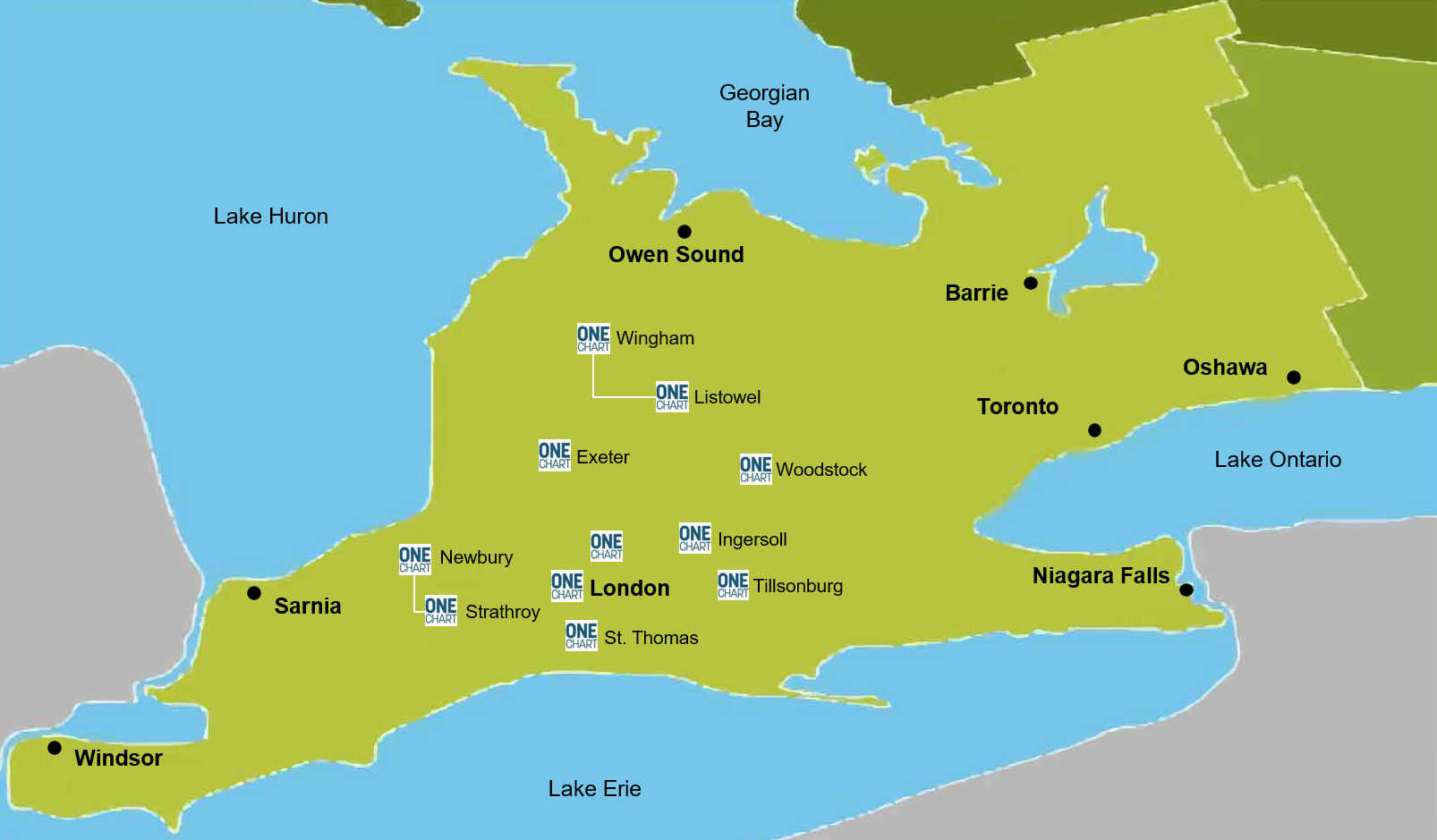
Patients aged 16 and older can request enrollment in MyCarePortal at participating hospitals listed below, during registration for their appointment:
- Alexandra Hospital Ingersoll ⚕
- Four Counties Health Services
- Listowel Memorial Hospital
- London Health Sciences Centre
- South Huron Hospital
- St. Joseph’s Health Care London
- St. Thomas Elgin General Hospital
- Strathroy Middlesex General Hospital
- Tillsonburg District Memorial Hospital ⚕
- Wingham and District Hospital
-
Woodstock Hospital
⚕ These partner organizations have recently merged as Rural Roads Health Services
- In-Person Enrollment
Patients aged 16 and older will be offered the option to enroll during their in-person registration at participating hospital sites
| Enrollment timeline | |
| South Huron Hospital | September 2025 |
| Alexandra Hospital Ingersoll | September 2025 |
| Tillsonburg District Memorial Hospital | September 2025 |
| Listowel Memorial Hospital | September 2025 |
| Wingham and District Hospital | September 2025 |
| St. Thomas Elgin General Hospital | October 2025 |
| Four Counties Hospital | November 2025 |
| Strathroy Middlesex General Hospital | November 2025 |
| Woodstock Hospital | December 2025 |
| St. Joseph's Health Care London | March 2026 |
| London Health Sciences Centre | March 2026 |
- Online Enrollment
Visit www.mycareportal.ca/enroll to complete the MyCarePortal Enrollment Form
MyCarePortal Online Enrollment – Frequently Asked Questions (FAQ)
1. Can I enroll in MyCarePortal online?
Yes. In addition to In-person enrollment, MyCarePortal now offers online enrollment through a secure online webform. You can complete the entire process online
2. What do I need to provide to enroll online?
To complete your online enrollment, you will be asked to upload:
- A photo or scanned image of the front of one acceptable government issued identification, and
- A photo of yourself holding the same acceptable government issued photo ID next to your face
(This helps us verify your identity as part of our secure enrollment process.)
All documentation must be clear, readable, and valid (not expired) at the time of submission.
3. What types of government issued identification are accepted?
MyCarePortal accepts the following valid (nonexpired) forms of government issued identification:
- Ontario Health Card
- Driver’s licence
- Ontario/Provincial Photo Card
- Canadian passport
- Permanent Resident (PR) card
- Secure Certificate of Indian Status (SCIS)
- Any other official Canadian government issued photo identification that includes your full legal name and date of birth
Note: Expired documents cannot be accepted.
4. Why do I need to submit a photo of myself holding my ID?
This “selfie with ID” step allows us to confirm that:
- The ID belongs to you
- The ID submitted is authentic
- You are the person requesting enrollment
This is a standard verification method used to protect your identity and health information.
5. How is my enrollment information protected?
All information submitted through the MyCarePortal online enrollment webform is:
- Encrypted
- Stored securely following strict privacy and data protection standards
- Used only for the purpose of verifying your identity and setting up your MyCarePortal account
We do not share your information without your consent unless required by law.
6. How long does the online enrollment process take?
Most online enrollment requests are reviewed within 3–5 business days.
You will receive an email notification once your account has been processed or if additional information is required.
7. What happens if my enrollment information is incomplete?
If your information cannot be verified, you will receive an email with instructions on:
- What needs to be corrected
- How to resubmit your documents
- Additional steps, if needed
8. Who can I contact if I need help with my online enrollment?
If you have questions or experience difficulties with the webform or documentation upload, you can contact our support team at:
e-mail: mycareportal@lhsc.on.ca
Or via phone number 519-685-8500 x58286
The link to the MyCarePortal website will be included in a welcome email sent after you successfully claim your invitation. MyCarePortal can be accessed using the following web browsers:
- Mozilla Firefox
- Google Chrome
- Microsoft Edge
-
Apple Safari
You can also download the MyCarePortal app from the Apple Store or Google Play Store
Currently, English is the only language available to MyCarePortal users in Canada.
Invitations expire 10 days after they are sent. If your invitation has expired and you would still like access, please contact the MyCarePortal Support Team at MyCarePortal@lhsc.on.ca to explore your options.
MyCarePortal does not contain your complete Electronic Health Record. It includes most of your personal health information that has been electronically documented by the partner organizations:
- Alexandra Hospital Ingersoll
- Four Counties Health Services
- Listowel Memorial Hospital
- London Health Sciences Centre
- South Huron Hospital
- St. Joseph’s Health Care London
- St. Thomas Elgin General Hospital
- Strathroy Middlesex General Hospital
- Tillsonburg District Memorial Hospital
- Wingham and District Hospital
- Woodstock Hospital
Information from your community-based physicians, labs, and diagnostic imaging is not available in MyCarePortal.
These results are available to you as soon as they are accessible to the health care team. Please be aware that there is the potential to read upsetting results. Your health care team will provide more context during your next encounter with the care team.
This includes results for:
- Vital signs
- Lab work
- Microbiology
- Pathology
- Diagnostic imaging reports
Select discharge notes will be available to you in MyCarePortal once they are finalized by your health care team.
There are three categories of information with different release dates.
-
Select results dating back to 1998, including:
Vital signs
Lab work
Microbiology
Pathology
2. Diagnostic imaging reports
3. Discharge notes signed on or after October 1, 2018
MyCarePortal will display the written report based on the assessment of the images, but not the images themselves.
There are two reasons why you may not be seeing your test results:
- The test was recently completed, and the results are not ready yet.
- Some test results are not available in MyCarePortal, including:
- Toxicology
- HLA and tissue typing
- Forensic or autopsy results
Please note: Toxicology, genetic testing, and tissue typing results will be available to you through the clinic where you received care. Forensic or autopsy results can be accessed by the executor of the patient’s estate upon request through a Release of Information made in Health Information Management (Health Records) at the hospital where the patient received care.
You will need to contact the Health Records Department at the hospital where you wish to obtain your health records.
There are three reasons why a patient may lose access to MyCarePortal:
- If a patient goes two years without using MyCarePortal.
- If a patient violates the MyCarePortal Terms of Use and/or Privacy Policy.
- If there is a clinical reason, determined in collaboration with the care team, patient relations, privacy, and risk.
There are two categories of information, each with different follow-up steps:
- Incorrect contact information: To update an email, home address and/or telephone number, you will need to speak with a member of the registration staff at your next hospital appointment.
- Incorrect clinical information: If you wish to request corrections to your health records, contact the Privacy Office at the partner organization that is listed as having provided the health records in MyCarePortal.
If you are not able to identify which partner organization contributed the data to MyCarePortal, contact the Regional Privacy Office by phone at 519-685-8500 ext 32996 or by email at privacy@lhsc.on.ca and they will be happy to assist.
Please do not include Personal Health Information in your email.
Please reach out to the Patient Relations, Privacy, or Risk at the hospital you received care.
- MyCarePortal gives patients access to a subset of their personal health information that is stored in their Electronic Health Record at any of our partnering organizations in London and the Region, at no cost to the patient.
- ConnectMyHealth is different than other patient portals because it consolidates various types of health records from hospitals you've visited into one unified view, also at no cost to the patient. It serves 4.1 million people across diverse urban and rural communities, from Waterloo to Windsor, and Tobermory to Niagara Falls. To access it and for more information, visit ConnectMyHealth.
- PocketHealth only includes diagnostic images and reports. Patients can request access to their medical imaging from over 600 hospitals and clinics. This service is available at a cost to the patient.
Please click on the PDF file below for a comparison between MyCarePortal and ConnectMyHealth
This can be done while logged into MyCarePortal by clicking on the Manage my Account button at the top of the homepage, or the user’s name in the bottom left corner. Type your first name and/or last name, or email address in the appropriate fields. To complete the changes, click the Save button.
Please note: Changing your name and/or email address in MyCarePortal does not change the name and/or email address the hospital uses to communicate with you
To update an email, home address and/or telephone number within your chart, you will need to speak with a member of the registration staff at your next hospital appointment.
To change your password in MyCarePortal, follow one of these steps:
Option 1: Password reset via email
- Go to the MyCarePortal login page (blue button located below)
- Click on the "Forgot Password" link under the username and password fields.
- Enter the email address associated with your account in the box under "What's your username?".
- You will receive an email with a link to reset your password, then follow the instructions.
Option 2: Change password in Account Settings
- Log in to MyCarePortal using your current username and password.
- Click on "Manage Account".
- Click "Change Password”'.
- You will receive an email with a link to reset your password, then follow the instructions.
The browsers listed below are recommended for viewing and using your patient portal to ensure the best experience. MyCarePortal supports the current release of each browser and its most recent, previous release.
- Apple Safari and Apple Mobile Safari
- Google Chrome
- Microsoft Edge
- Mozilla Firefox
Please complete and submit the unenrollment form by clicking the button below.
1.What is MultiFactor Authentication (MFA)?
MFA is an extra layer of security used to verify your identity when logging into MyCarePortal. It requires two steps:
a) your password, and
b) verification code sent to your phone, email.
2. Why is MFA being added to MyCarePortal?
Your privacy and security are our top priority. MFA helps protect your account from unauthorized access and significantly reduces the chances of identity theft, fraud, or misuse of your personal health information.
3. Do I have to use MFA?
Yes. Once MFA is enabled, all users must complete the verification step to access their accounts.
4. Will MFA make logging in more difficult?
Not at all. The process only adds a few seconds to your login and is designed to be simple, secure, and user-friendly.
5. Is my personal information safe?
Absolutely. MFA strengthens your account security and helps us ensure that only you can access your health information.
6. How often will I need to use MFA?
You will be asked to verify your identity each time you log in. This helps us ensure it’s really you accessing your health information.
7. What verification methods can I choose from?
You can choose from several options during setup, including:
- A code sent by text message (SMS), or
- A code sent to your email
You’ll be able to select the method that works best for you.
8. How do I set up MFA for the first time?
When you next log into MyCarePortal after MFA is enabled, you’ll automatically be guided through a simple setup process. Step-by-step instructions will appear on screen to help you choose your preferred verification method.
9. What should I do if I lose my phone or change my number?
If you lose access to the device or email you use for MFA:
- Contact Oracle Health Customer Care Support Centre available 24/7 at 1-800-390-0123
This ensures you can access your account safely.
10. Can I update or change my MFA method later?
Yes. You can update your MFA preferences within your MyCarePortal Profile. See Reset Secure Verification Guide for more details.
11.What if I’m not receiving my verification code?
Try the following:
- Check your spam or junk folder if you’re expecting an email
- Make sure your phone has a signal if waiting for an SMS
-
Confirm your phone number or email address on file is correct
If issues continue, contact Oracle Health Customer Care Support Centre available 24/7 at 1-800-390-0123.
12. Is my personal information safe?
Absolutely. MFA strengthens your account security and helps ensure that only you can access your personal health information.
13. Who can I contact for help with MFA?
- If you experience any issues or need assistance with MFA setup or recovery, please contact Oracle Health Customer Care Support Centre available 24/7 at 1-800-390-0123.
Need some help?
Technical Questions: Please contact the 24/7 support line at 1-800-390-0123. This toll-free number connects you to the Oracle Health Customer Care Support Centre, situated in Kansas City, Missouri.
Enrollment Question: If you need assistance with enrollment or navigating MyCarePortal, please contact us via email at MyCarePortal@lhsc.on.ca or leave a voicemail at 519-685-8500 ext. 58286. We aim to respond within three business days. Your patience is greatly appreciated.

Participating Hospitals